Listen to the Quran: reciters, riwayat, tafsir, radio
Listen to the Quran online: 230+ reciters, the Ten Readings, audio tafsir and 170+ live radio stations. Free, no ads, no account needed.
On this page
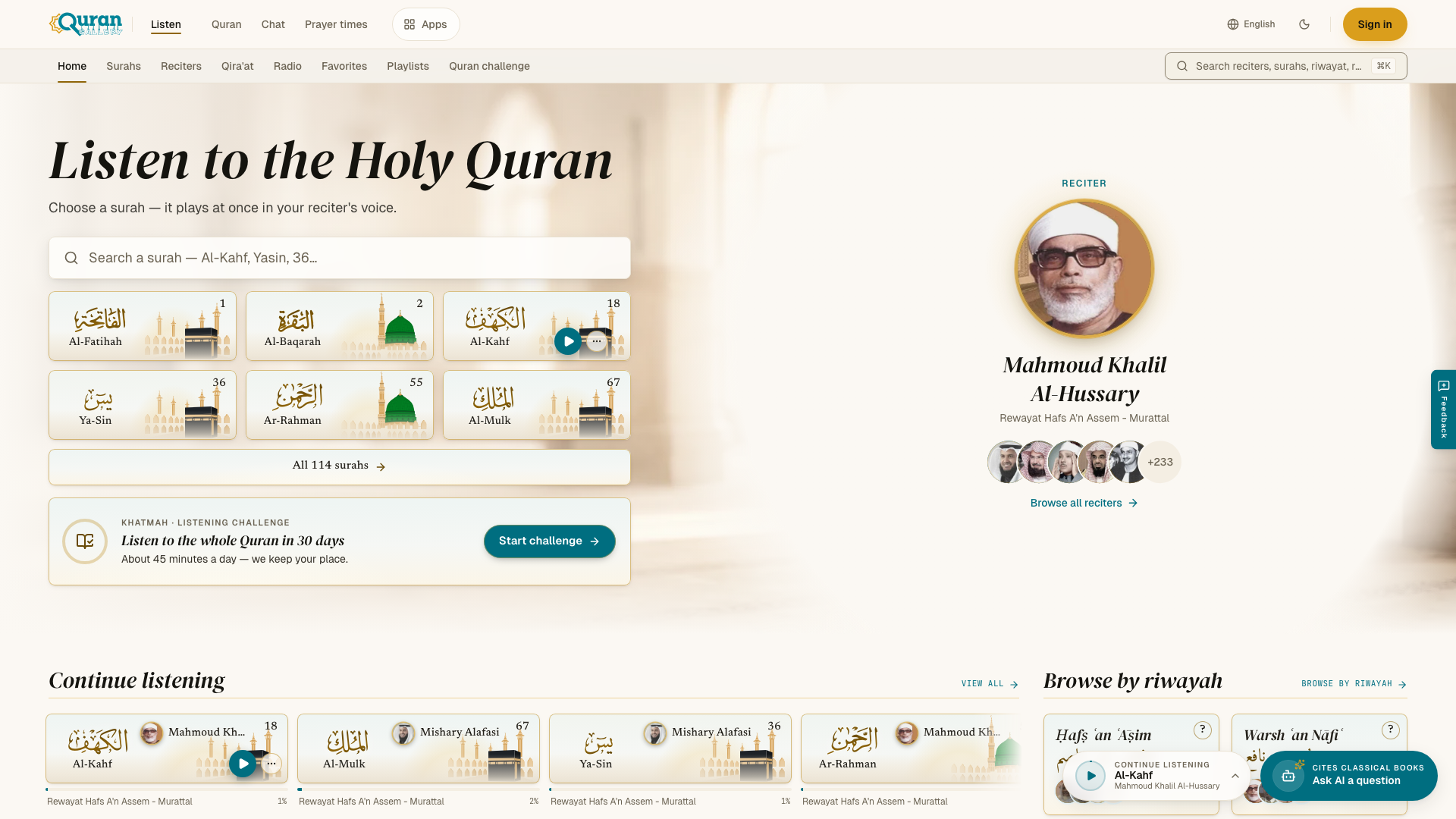
Quran Gallery Listen is a free Quran audio app at qurangallery.com/listen: more than 230 reciters, the Ten Readings, audio tafsir and more than 170 live radio stations. It shows no ads and you do not need an account to listen. The player has a sleep timer, repeat, speeds from 0.25× to 2×, background play and MP3 download, and favorites and playlists stay on your device without an account: see the Listen player.
Common tasks
- Find a surah by name or number in Listen
- Compare Quran reciters by voice and riwayah
- Listen to the Quran in Hafs, Warsh and Qalun
- Audio tafsir with speed control and downloads
- 24/7 Quran radio: 170+ live stations
- Save favorites and build Quran playlists
- Finish the Quran: khatmah listening plan
- Quran player: speed, repeat and sleep timer
The catalogue in numbers
The catalogue grows, so counts here are rounded down. The app always shows the current number.
| What | How many |
|---|---|
| Reciters | 230+ |
| Surahs | All 114, for every reciter who has recorded them |
| Readings (riwāyāt) | 18 transmissions of the Ten Readings, plus 2 recording styles (Muʿallim and Mujawwad) |
| Audio tafsir | 1 collection in Arabic, surah by surah |
| Live radio stations | 170+, streaming 24 hours a day |
| Collections | 5 short selections for moments of the day |
Listen is available in seven languages: English, Arabic, Urdu, Indonesian, Turkish, Bengali and French.
What you can do
| Section | What it is | Read more |
|---|---|---|
| Home, Surahs and search | Find any surah and play it in your reciter. Search finds reciters, surahs, readings and stations. | Finding a surah |
| Reciters | A directory of every voice, with a page for each reciter and each recording. | Reciters |
| Qira’at | The Ten Readings of the Quran and their transmitters. | The Ten Readings |
| Tafsir | Spoken explanation of the Quran, surah by surah. | Audio tafsir |
| Radio | Live Quran stations. | Live radio |
| Collections | Short selections for Friday, morning, evening and more. | Collections |
| Library | Your favorites, listening history, playlists and Quran challenge. | Favorites, playlists & history, Quran challenge |
| The player | The audio player that stays at the bottom of the screen. | The player |
How it is organized
On a computer or tablet, the tabs under the top bar are Home, Surahs, Reciters, Qira’at, Radio, Favorites, Playlists and Quran challenge. The search box sits at the end of the same row.
On a phone, a tab bar at the bottom of the screen has Home, Surahs, Search and Library. Library holds your favorites, listening history, playlists and Quran challenge.
Whatever page you open, the recitation keeps playing in the player at the bottom of the screen. You can browse for the next thing to hear without stopping what is playing now.
Do I need an account?
No. Everything plays without signing in. Your favorites, listening history, playlists and Quran challenge are saved on your device.
If you sign in with your Quran Gallery account, they are also saved to your account and appear on every device where you sign in. Anything you saved before signing in is added to your account, so nothing is lost.
Downloads and offline listening
- Download a recording. Open the ⋯ menu on any surah and choose Download. The player’s Up next panel has a Download button too. The file is saved as an MP3, named after the surah and the reciter.
- Open the audio file. Each recording page and each tafsir page has an Open audio file (new tab) button.
- What you can download. Surah recitations and audio tafsir. Live radio is a stream, so it cannot be downloaded.
- Save for offline. Choose Save for offline in a surah’s ⋯ menu. Listen asks first and shows the space it will use on your device. Saved recordings are on the Saved offline page (qurangallery.com/listen/downloads), where you can play or remove them. Saving needs a browser that supports service workers. A downloaded MP3 file also plays in your device’s audio player.
Next steps
Questions
Is Quran Gallery Listen free, and do I need an account?
Yes, it is free and shows no ads. Everything plays without signing in. Favorites, playlists, history and your Quran challenge are saved on your device; sign in to also keep them on your account.
How many reciters and radio stations does Listen have?
More than 230 reciters and more than 170 live radio stations. The catalogue grows, and the app always shows the current count.
Can I listen to the Quran offline?
Yes. Choose Save for offline in a surah's ⋯ menu. Listen shows the space it will use, and saved recordings play from the Saved offline page at qurangallery.com/listen/downloads. It needs a browser that supports service workers, and live radio cannot be saved.
Can I download a surah as an MP3 file?
Yes. Open the ⋯ menu on a surah and choose Download, or use the Download button in the player's Up next panel. Live radio is a stream and cannot be downloaded.
Which languages does Listen support?
Seven: English, Arabic, Urdu, Indonesian, Turkish, Bengali and French.