Prayer times
Set your location, read the five daily prayer times, and tune calculation methods at qurangallery.com/prayer.
On this page
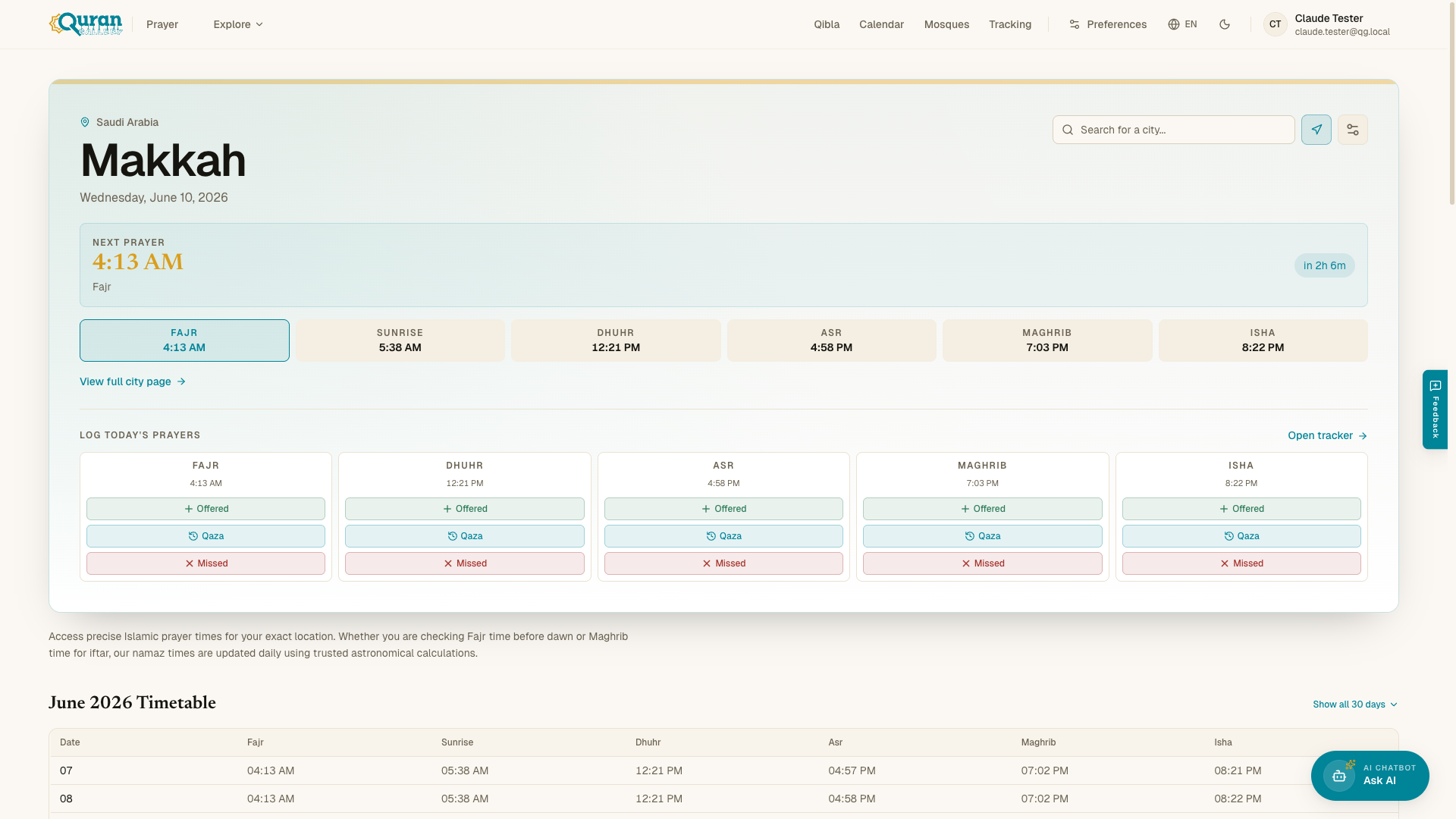
The prayer times page at qurangallery.com/prayer shows the five daily prayers plus Sunrise for wherever you are. It marks which prayer is Current and which is Next, and counts down to the next one. Times update daily using astronomical calculations.
Setting your location
You need a location before any times appear — until then you’ll see “Set your location to see prayer times.” There are two ways to set it:
- Use Current Location — let the page read your GPS. If your browser blocks it you’ll see a message like “Location access denied. Please search manually.”
- Search for a city — type into the “Search for a city…” box and pick a match.
Your chosen location shows under Your Location with a Clear (✕) button. To switch to a different place, clear the current one and search again — or just Use Current Location.
No location set yet? Where your browser can give an approximate position, the page shows an estimated times banner — “Estimated times for [city]” — with a reminder to “Set your location for precise prayer times.” Set a location to replace the estimate with exact times.
The five daily prayers
Each prayer is tied to the sun’s position through the day:
| Prayer | When |
|---|---|
| Fajr | Pre-dawn prayer before sunrise. |
| Sunrise | Not a prayer — marks the end of Fajr. |
| Dhuhr | Midday, after the sun passes its zenith. |
| Asr | Afternoon, in the late part of the day before sunset. |
| Maghrib | Sunset, immediately after the sun sets below the horizon. |
| Isha | Night, after twilight disappears — the last prayer of day. |
Calculation methods
Different authorities compute the dawn and dusk twilight angles slightly differently. In Prayer Settings → Calculation Method you can choose from:
| Method | Typically used in |
|---|---|
| Muslim World League | Europe, the Far East, parts of the Americas |
| Egyptian General Authority | Africa, Syria, parts of the Middle East |
| University of Islamic Sciences, Karachi | Pakistan, Bangladesh, India, Afghanistan |
| Umm Al-Qura University, Makkah | Saudi Arabia |
| Dubai | United Arab Emirates |
| Moonsighting Committee | Communities following Moonsighting.com |
| ISNA (North America) | United States and Canada |
| Kuwait | Kuwait |
| Qatar | Qatar |
| Singapore | Singapore and the wider region |
| Tehran | Iran and some Shia communities |
| Turkey | Türkiye (Diyanet) |
| Other (Custom) | A fallback for tuning times yourself |
The default is Muslim World League.
We recommend comparing with your local masjid so your times match your congregation. If they differ slightly, the Time Adjustments below let you nudge individual prayers into line.
Asr (madhab)
The Madhab (Asr Calculation) setting controls when Asr begins:
- Shafi — the standard method (also used by Maliki and Hanbali). Asr starts when an object’s shadow equals its height.
- Hanafi — Asr is delayed until the shadow is twice the object’s height.
Adjustments & format
Other options under Prayer Settings:
- Time Adjustments (minutes) — nudge any prayer earlier or later with per-prayer offsets, so you can match your local masjid to the minute.
- 24-hour Format — switch between 12-hour and 24-hour display.
Use Reset (at the top of the panel) to return all settings to their defaults.
Far north or south? At extreme latitudes the sun may not dip far enough for a true Fajr or Isha on some days. The app falls back to the nearest valid day so you always get a sensible time, rather than a blank.
Calendar Authority
Also under Prayer Settings is Calendar Authority — the moon-sighting authority used for Islamic (Hijri) dates everywhere in the app, including the Hijri calendar. The default is Auto (based on location), which picks a sensible authority for your country; choose a specific authority if your community follows a different one.
This is the app-wide version of the Method dropdown on the calendar page — set it once here and the whole app follows. See The Hijri calendar for what each authority means.
Streak, sharing & quick-logging
When you’re signed in, the prayer times page gains a few extras:
- Streak card — if you have an active prayer streak, a small card shows your Current Streak in days and links straight to prayer tracking.
- Quick-log — a prayer whose time has passed shows a one-tap control to mark it prayed, so you can log without leaving the times list.
- Share Prayer Times — once your location is set, a Share Prayer Times card appears in Prayer Settings with a Copy Link button. The link carries your location and calculation method, so whoever opens it sees the same times you do.
Monthly timetable & city pages
Beyond today’s times, you can browse a full monthly timetable. Each city has its own page at qurangallery.com/prayer/[country]/[city]/[year]/[month], and you can Browse by Country or jump to Popular Cities worldwide.