Connect ChatGPT to the Shamela library
Add the Quran Gallery MCP server to ChatGPT step by step, with screenshots: one URL, No authentication, then search 8,594 classical Arabic books.
On this page
No account, no sign-in, no key. Add this URL to ChatGPT as a custom MCP server and set Authentication to No authentication:
https://qurangallery.com/mcp/shamelaSetup takes about a minute. It worked on a Free ChatGPT account when this guide was written (October 2026). On a Business or Enterprise workspace, an admin may have to allow custom MCP servers first.
1. Open Plugins and add a custom server
Open chatgpt.com/plugins. At the top right, click Add, then Add custom MCP server.

2. Fill in the form
| Field | Enter |
|---|---|
| Icon (optional) | quran-gallery-icon.png: download it, then click + and pick the file |
| Name | Quran Gallery |
| Description (optional) | Search classical Arabic Islamic books with printed-page citations |
| Connection | Keep Server URL selected and paste https://qurangallery.com/mcp/shamela |
| Authentication | No authentication |

Tick I understand and want to continue, then click Create as a plugin.

Type the URL yourself or copy it from this page. A link copied from an email can be a google.com/url?q=… redirect rather than the address itself, and ChatGPT rejects it.
3. Connect
ChatGPT shows what the plugin may do. Click Connect. A message confirms Quran Gallery is now connected.

4. Check that it is installed
Open Settings → Plugins. Quran Gallery appears in the list with its icon. All of its tools are read-only.

5. Use it in a chat
Start a new chat. Click + in the message box and pick Quran Gallery. Then ask your question.

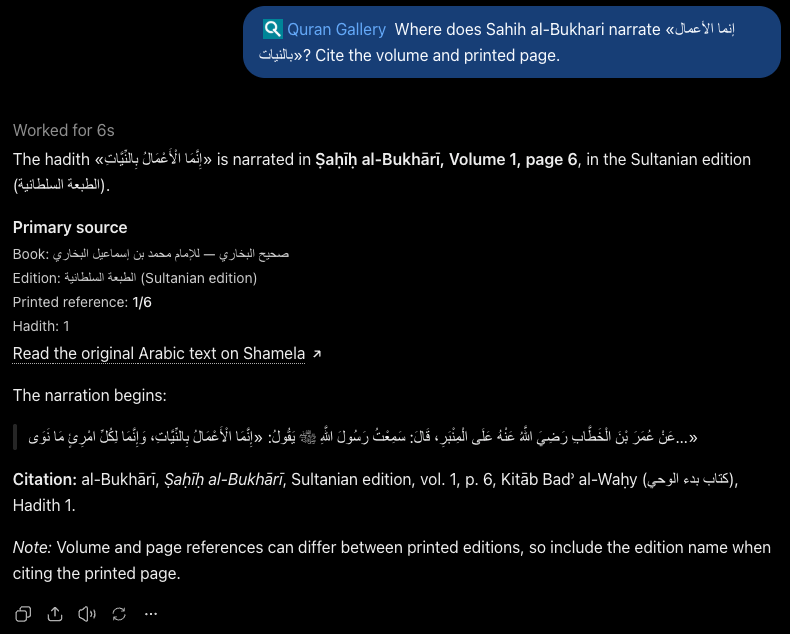
The answer names the edition, volume and printed page, and links to that page in the Maktabah reader:
Manage, refresh or remove
Open Settings → Plugins and click Quran Gallery. Under Manage app you can rename it, Refresh tools after our server adds a tool, or Delete app.

You cannot edit the server URL or the icon once the plugin exists. To change either, delete the plugin and add it again.
Deep research
ChatGPT deep research and company knowledge need two read-only tools named search and fetch. This server provides both, listed to every client alongside the other tools. search takes one query and returns results with id, title and url; fetch takes an id and returns id, title, text, url and metadata. The url of every result is the page in the Maktabah reader.
First prompt to try
Find the hadith «إنما الأعمال بالنيات» in the primary collections and tell me which book, edition, volume and page it is printed on. Quote the Arabic exactly.
Your assistant should call shamela_search_library (or search then fetch). The hits include صحيح البخاري, ط السلطانية, page 1/6, with a link to that page in the Maktabah reader. If it answers from memory instead, say: “Use the Quran Gallery library tool and quote what it returns.”
Search queries must be in Arabic; your assistant translates English terms first (details). Ready-made prompts for takhrīj, citing a passage and comparing tafsir are listed in the full tool surface.
Troubleshooting
- “Some app settings were rejected. Check the server URL or tunnel ID, icon, and authentication settings.” Check three things. The URL must be exactly
https://qurangallery.com/mcp/shamela, not a redirect link from an email. Authentication must be No authentication. The icon must be a PNG of at least 256×256 pixels and under 10 KB; ours fits, or you can leave the icon out. If you tried before our fix, add the server again. - “Couldn’t discover OAuth settings.” Authentication was left on OAuth. Change it to No authentication.
- “An app with this name already exists.” You added it before. Delete the old plugin first (see Manage, refresh or remove), or pick another name.
- Create as a plugin does not respond. Tick I understand and want to continue first.
- No Plugins page or no Add custom MCP server. Older accounts reach the same form through Settings → Apps & Connectors → Advanced settings → Developer mode → Create. Use the same URL and No authentication. On a work account, ask your workspace admin to allow custom MCP servers.
- 429, “Keyless limit reached”. Keyless use allows 10 tool calls a minute and 200 a day per IP address. Wait for the
Retry-Afterheader. See Limits and errors. - 503. The server or the library behind it is briefly unavailable. Retry after the
Retry-Afterheader. If the plugin lists zero tools, wait a minute and click Refresh tools. - The tools do not appear, or a tool you expect is missing. ChatGPT reads the tool list when you create the plugin. Click Refresh tools, then start a new conversation.
- Connection fails immediately. The endpoint is
/mcp/shamela. The bare/mcpis a web page, not the server.
Optional: a free key for higher limits
A key is never required. A free key raises the limit to 60 calls a minute and lifts the keyless page-range caps. ChatGPT’s custom-server form offers only OAuth or no authentication, with no field for a bearer header, so ChatGPT stays on the keyless tier. If you need the key, use Claude, Claude Code, Cursor, VS Code or Gemini CLI. Create one on the Developers page of your Quran Gallery account (how keys work).