Delete your account
How account deletion works — what gets removed, what is kept anonymously, and how to recover before deletion is final.
On this page
Account deletion is the heavy artillery. It signs you out everywhere, removes your sign-in credentials, and detaches your identity from any data that’s tied to it. The control lives in the Danger zone card at the bottom of your settings.
Deletion is immediate in the sense that your sessions, API keys, password, and connected providers are wiped right away. The account record itself is soft-deleted — flagged with a deletion date but kept around briefly for fraud-prevention and accidental-deletion recovery. See “What ‘soft delete’ means” below.
How to delete your account
- Sign in to accounts.qurangallery.com.
- Open Settings and scroll to the very bottom — the Danger zone card with a red border.

- Click Delete Account. A confirmation form expands inside the card.
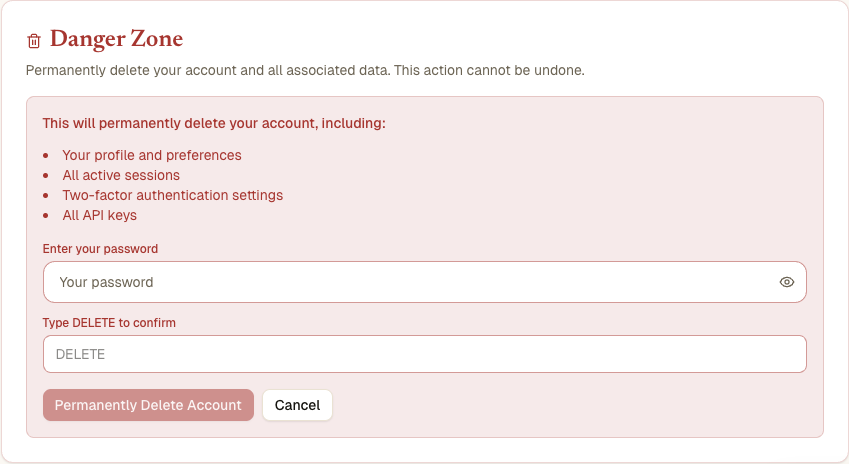
- Fill in:
- Your password (only if you have one set — Google/Quran.com-only users don’t see this field).
- The literal word
DELETEin the confirmation field — typed exactly, all caps.
- Click Delete Permanently.
You’re signed out, your cookies are cleared, and you’re redirected back to the sign-in page.
What gets removed
The moment you click Delete Permanently:
- All your sessions are revoked. Every device you were signed in on is signed out on the next request.
- Your password is deleted from our database.
- Your Google and Quran.com connections are detached. Your underlying Google/Quran.com accounts are untouched — only the link from those to your Quran Gallery account is gone.
- All your API keys are deleted. Any script or service that was using one starts getting 401 Unauthorized.
- Your two-factor authentication setup is deleted (TOTP secret and backup codes).
- Your email is mangled on the user record — replaced with a one-time value that no longer matches a real inbox. This lets you re-register the same email later if you want to come back.
What ‘soft delete’ means
The user record itself isn’t physically removed from our database the instant you click Delete. Instead, it’s flagged with a deleted_at timestamp. From your perspective, the account is gone — you can’t sign in, your sessions are dead, your data is detached. But for a short retention period we keep the record around so we can:
- Prevent re-registration shenanigans — a banned user creating a new account, deleting it, and trying again.
- Recover from accidents — if you tell us within a few days that you didn’t mean to delete, support can reverse the soft-delete.
After the retention period, the record is removed for real and recovery is no longer possible.
What’s kept (anonymously) and what’s not
Different Quran Gallery apps handle the link from “user account” to “user data” differently:
- Sessions, API keys, 2FA, password, OAuth links — gone permanently.
- Bookmarks, notes, reading history, hifz progress, listening history stored in Quran.com (when you connected via Quran.com) — those live in Quran.com’s database, not ours. They survive your Quran Gallery deletion. To remove them, delete them in your Quran.com account directly.
- AI chat history stored locally on your devices — survives until you clear the data on each device.
- Audit log entries for your account — soft-deleted along with the account, removed when the retention period ends.
If you need a hard-delete-everything-everywhere-now, contact support and ask.
I’m signed in through Google/Quran.com — can I still delete?
Yes. If you don’t have a password, the password field doesn’t appear in the deletion form, and the DELETE typed confirmation is enough on its own. You can also delete by first setting a password and then using the password gate, if you prefer the extra friction.
I want to delete because I forgot my password and can’t sign in
You can’t delete the account without being signed in. Either:
- Use Forgot password to recover, then delete; or
- Contact support, who can either help recover the account or delete it on your behalf.
I changed my mind — what now?
If you’ve just deleted (within the retention window), email support from the email address that was on the account. We may be able to reverse the soft-delete and reattach your previous data.
If you’re past the retention window, the account is gone for good. You can still re-register the same email and start a new account, but it will be empty.
Why is there a confirmation word?
Because account deletion is irreversible after the retention window, and “Are you sure? (Y/N)” prompts have led many people to accidentally lose their data over the years. Typing DELETE by hand makes deliberate destruction slightly slower than careless destruction. We borrowed the pattern from GitHub.