AI chat for Islamic questions with sources
Ask Quran Gallery Chat an Islamic question. An AI writes the answer from Shamela library passages it retrieves and cites each by book, author and page.
On this page
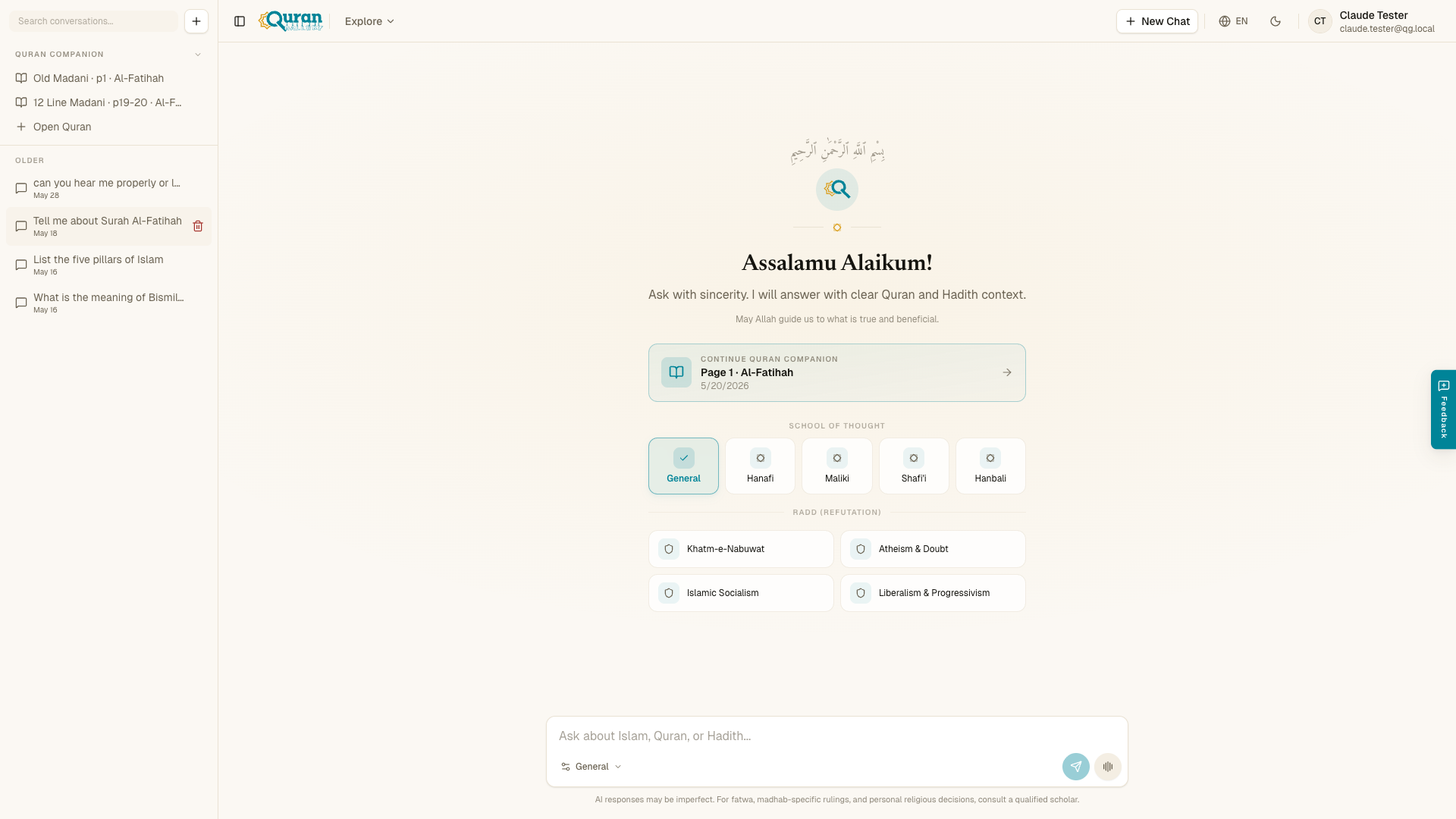
Quran Gallery Chat answers Islamic questions by searching the Maktabah al-Shamela library, then an AI model writes the answer from the passages it finds and cites them. Open it at qurangallery.com/chat. The model can still make mistakes, so confirm rulings with a qualified scholar.
Common tasks
- How to use Quran Gallery Chat for Islamic questions
- Filter Islamic AI answers by madhab
- Chat answers with sources, tool cards and citations
- Study a Quran page with the AI companion
What it does
- Referenced answers. Every response points to where it comes from — Quranic verses, authentic (Sahih) Hadith, and classical Islamic texts — so you can check the source yourself.
- Grounded in scholarship. Answers follow the methodology and consensus of Ahlus Sunnah scholars, drawn from recognized classical works. One exception to the usual answer style: the Radd (Refutation) modes frame the conversation as an evidence-based rebuttal of a particular set of ideas, so they read as debate and refutation rather than a standard fiqh answer — see Schools of thought & special modes.
- Retrieved from a library, not from memory. For each question the chatbot searches the Maktabah al-Shamela library of 8,594 classical Arabic books and shows the passages it found. An AI model then writes the answer from those passages and cites them by book, author and page. The model composes the wording, so it can still make mistakes. When no passage is found, or the library cannot be reached, the answer comes without a book citation and says its source could not be verified.
- Ask in any language. Write your question naturally in whatever language you prefer, and the answer comes back in that same language.
- Context-aware conversations. Follow-up questions keep the thread of what you were discussing, so you can go deeper without repeating yourself.
A closed library, not a general chatbot
Quran Gallery Chat is not a general-purpose assistant. It talks only about Islamic knowledge (the Quran, Hadith and related topics) and politely steers off-topic requests back. What it says comes from a closed library: the Maktabah al-Shamela collection of 8,594 classical Arabic books, plus the Quran, classical tafsir and the main hadith collections. It does not answer from the open web.
Each answer cites the passages it used by book, author and page, and quotes the Arabic. If nothing usable is found, the answer says its source could not be verified instead of inventing a reference. See Chat answers with sources, tool cards and citations.
Getting started
You need to be signed in to start chatting. The home page shows Sign in to start chatting... in the message box until you do. Sign in with your
Quran Gallery account (see the Accounts & SSO docs), then open the chatbot
and ask your first question — the input is ready with the placeholder Ask about Islam, Quran, or Hadith....
Reading a shared conversation needs no account. When someone shares a chat with you, the link opens a read-only view that anyone can read without signing in. You only need an account to start your own conversation. See Having a conversation for how sharing works.
A note on trust
The chatbot is built to be careful and to show its sources, but it is still an AI tool — not a scholar. Treat its answers as guidance for learning, not as final rulings. For anything that affects how you practice your faith, confirm with a qualified scholar.
AI responses may be imperfect. For fatwa, madhab-specific rulings, and personal religious decisions, consult a qualified scholar.
The app reinforces this with an Important Religious Alert: never make fatwa-level decisions from AI predictions alone — AI can make mistakes. Consult a qualified Mufti or scholar before acting.
What’s next in these docs
The rest of this section covers how to hold a conversation (starting chats, voice input, history, and sharing), how to choose a School of Thought and turn on special modes, and how to use Quran companion mode to read a mushaf page alongside the chat.
Next steps
Questions
Can the AI chat get an answer wrong?
Yes. An AI model writes the wording from retrieved passages, and a second automated pass checks each claim against the page it cites. No person reviews an answer before you see it, so confirm rulings with a qualified scholar.
Does Quran Gallery Chat cite its sources?
Yes, by book, author and page, from the passages it retrieved for your question. When nothing usable is found or the library cannot be reached, the answer has no book citation and says its source could not be verified.
Which books does the chat search?
The Maktabah al-Shamela library of 8,594 classical Arabic books, plus the Quran, classical tafsir and the main hadith collections.
Can I choose a madhab?
Yes. The School of Thought setting offers General, Hanafi, Maliki, Shafi'i and Hanbali, and ruling questions search that school's own books first.
Do I need an account to use the chat?
You sign in with your Quran Gallery account to start a conversation. A shared conversation link opens a read-only view that anyone can read without signing in.