The tasbeeh counter
Start with the Sunnah after-salah rings, add Sunnah, custom, or free-counter goals, count on a focused screen, and review My Journey.
On this page
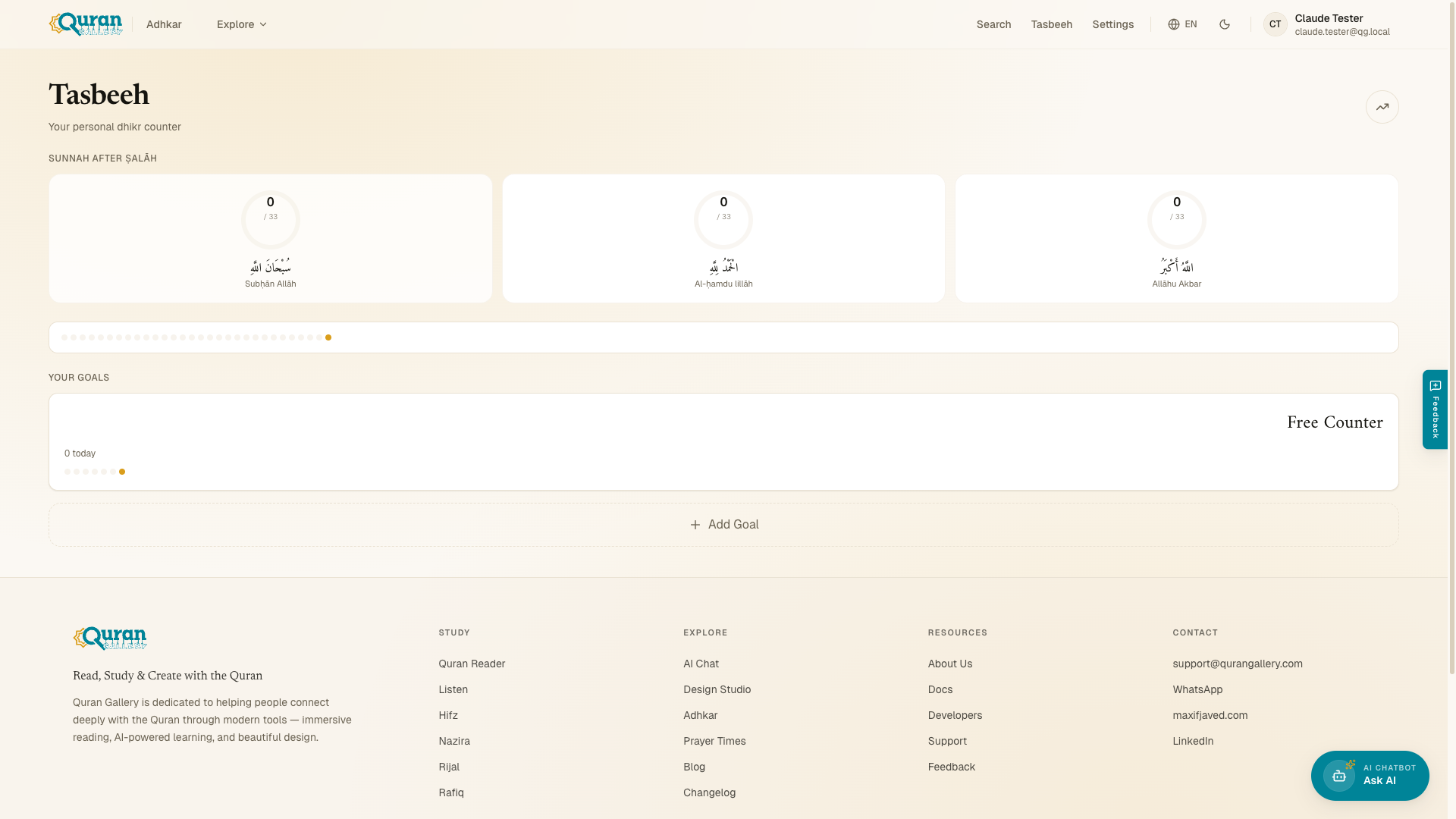
The Tasbeeh counter is your personal dhikr counter — “Your personal dhikr counter” — for tracking how many times you recite a phrase and for working toward goals. Open it at qurangallery.com/adhkar/tasbeeh.
You never start from a blank screen. The hub opens with everything you need to begin counting straight away.
What’s on the hub
- Sunnah after Ṣalāh — a row of three rings for the tasbeeh recited after every obligatory prayer: SubhanAllah ×33, Alhamdulillah ×33, and Allahu Akbar ×33. Tap a ring to count it.
- 30-day consistency — a strip of dots showing which of the last 30 days you counted. This appears when you’re signed in and have counting activity on record.
- Your Goals — any Sunnah, custom, or free-counter goals you’ve created, with Add Goal to make more. If you haven’t added any goals yet, the hub shows quick-add shortcuts — Istighfār ×100, Salawāt ×100, or Custom… — as a starting point.
Your goals and counts are saved on your device, so the counter works offline. When you’re signed in, they sync to your Quran Gallery account and follow you across devices.
Creating a goal
Tap Add Goal to start a New Goal. You choose one of three types:
| Type | What it is |
|---|---|
| Sunnah Dhikr | Choose from recommended adhkar with hadith references. |
| Custom Dhikr | Enter your own phrase and target. |
| Free Counter | Just count — no specific dhikr. |
For a Custom Dhikr you give it a Name (for example, “My daily wird”) and optional Arabic Text, then move on with Next. When you’re done, Create Goal saves it.
Daily target and post-salah
While setting up a goal you can give it a Daily Target — the number you aim to reach each day. A goal can also be a Post-Salah Sequence, the set of adhkar recited after each obligatory prayer. A Free Counter carries no set count — it simply tallies upward.
The counting screen
Open a goal at /tasbeeh/count/[goalId] to count. The whole screen is the counter — a single large ring with the running count in the middle. Each tap advances the count by one, and the ring fills as you approach your target. If you’d rather not tap the screen, Space or Enter count too, so a keyboard works just as well.
As you count, the app gives you quiet feedback: a soft cue on every count, a stronger one each time you cross a multiple of 33 (33, 66, 99…), and a celebration when you reach your target. (Turn the chime off with Reduce sound in Settings; on Android the gentle vibration stays.)
- Dim / Bright — Dim drops the screen to a near-black, distraction-free view that hides the text and shows only the ring and the number, ideal for late-night dhikr. Bright brings the full screen back.
- Long-press to reset — to start the count over, press and hold the counter briefly (about half a second). You’ll be asked Reset counter? — “This will set the count back to 0.” — so a normal tap never wipes your progress. Confirm with Reset or back out with Cancel.
My Journey
My Journey, at /tasbeeh/journey, turns your counting into a picture of your habit:
- Consistency — how steadily you’ve been counting.
- Lifetime Totals — your all-time count across every goal.
- Period breakdowns — your totals this week, this month, and
{count}today.
If you haven’t counted yet, it reads Start counting to see your journey.