Study tools: tafsir, translations & more
Use the study drawer and Deep Study for tafsir, translations and word grammar, plus dedicated pages for qiraat, related verses, hadith, and reflections.
On this page
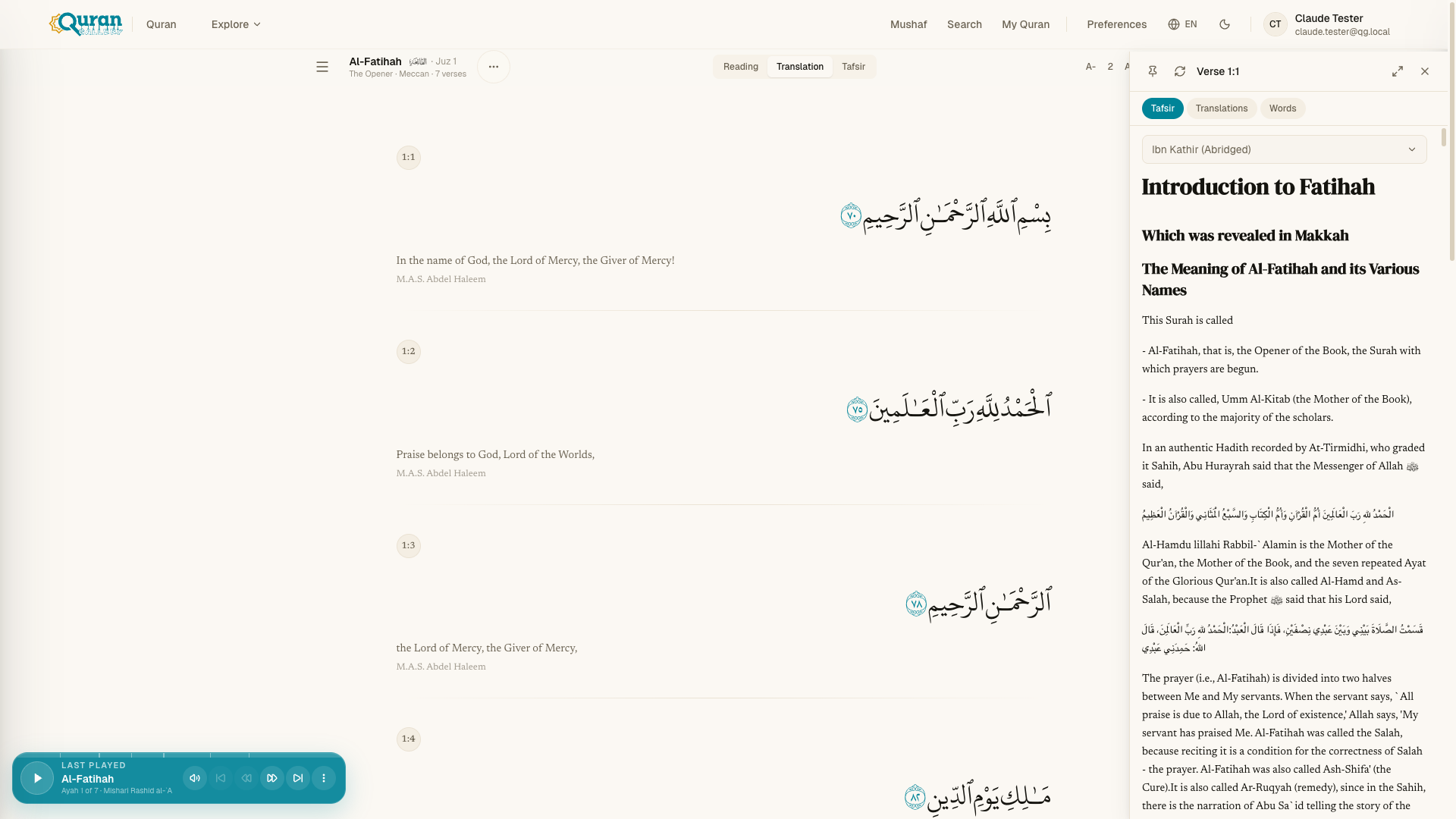
Every verse in the reader carries a layer of study material. You reach most of it through the study drawer, which stays synced to the āyah you’re reading. Open it from a verse’s Study action, then switch between its tabs. For longer study sessions, expand it to Deep Study — a full-screen workspace covered below. A few deeper references — qiraat, related verses, hadith — open as their own pages.
The study drawer
The drawer has three tabs, and it keeps pace with the verse in front of you:
| Tab | What it shows |
|---|---|
| Tafsir | Classical and modern commentary on the current verse. |
| Translations | The verse rendered in the translations you’ve chosen — read several side by side. |
| Words | Each Arabic word with its transliteration, meaning, and grammatical type. |
You can pin the drawer so it stays open as you scroll, or turn scroll sync off to hold it on one verse. The header also shows which āyah you’re studying.
Tafsir
Open Tafsir to read commentary on the current verse. Multiple tafsirs are available — use the picker at the top of the tab to choose a source, and switch between them at any time. Footnote markers in the commentary are tappable: select one to read the note inline, and select it again to dismiss it. If a verse has no commentary in the selected source, the tab says so plainly.
Translations
Turn translations on and they appear beneath the Arabic in the reader. In the drawer’s Translations tab you can pick which translations to show and compare them verse by verse — ideal for seeing how different translators render the same āyah. Use the picker to add or remove sources; it’s the same selection you set in Reading Preferences.
Words (word by word)
The Words tab breaks the verse into its individual Arabic words, each with its transliteration, English meaning, and word type. To show the same word-by-word text inline in the reading flow instead, turn on Word By Word in Reading Preferences — see Reading the Qur’an for the Inline, Tooltip, or Both display options.
Deep Study
When you want to sit with a single verse, choose Expand to deep study in the drawer header. Deep Study takes over the full screen: the Arabic āyah is pinned at the top, the study tabs sit below it, and previous / next controls walk you through the surah one verse at a time — your place in the study tools travels with you. A back arrow returns you to the reader where you left off.
Dedicated study pages
Some references are rich enough to have their own page, reached from the verse you’re reading:
| Page | What it covers |
|---|---|
| Qiraat | The canonical variant readings for the chapter, where they exist. |
| Related verses | Other āyāt connected by theme, wording, or subject. |
| Hadith | Narrations connected to the chapter, to read the text alongside the Sunnah. |
| Surah info | Background on the chapter — whether it is Meccan or Medinan, and more. |
If a page has nothing recorded for a chapter — no variant readings, say — it tells you plainly rather than leaving you guessing.